Posted By
Mercado Roma
2711 View(s)
(Blinking LEDs,Running Lights, On/Off Sequence)
DEMO:Blinking
Runnning Lights
ON OFF Sequence
Materials Need:
1 x gizDuino PLUS ATmega644P Starter kit
1 x Solderless Breadboard
8 x Green LED 5mm
8 x 560 Ohms Resistor/p>
1 x USB Cable
9 x 1pin Jumper Wire (male-male)
Schematic Diagram:
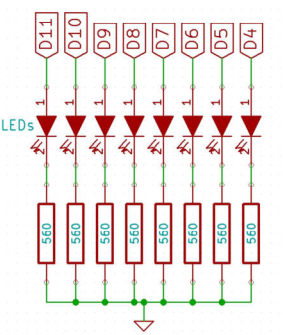
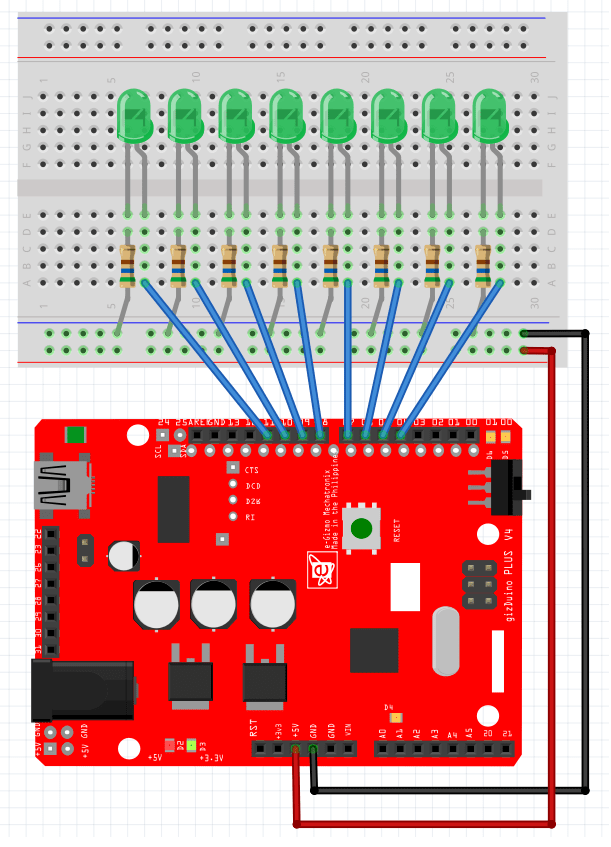
Wiring Connection:
Digital pin 4 to 11 --> (+) Anode LED
(-)Cathode --> 560 ohms --> Ground
Codes:
| /* |
| "GizDuino Starter kit" |
| |
| Blinking 8 LEDs |
| |
| STEP 1: Construct the circuit of GizDuino Blinking 8 LEDs. |
| STEP 2: Connect the USB Cable to your computer. |
| STEP 3: Open the Arduino IDE. |
| STEP 4: Open the BLINKING 8 LEDS Sample code from GizDuino Starter kit code. |
| STEP 5: Then, click Upload. |
| |
| This sample code turns ON the LEDs in 1 second and turn OFF |
| in 1 second. It is a simple and easiest way using more pins |
| for blinking LEDs. |
| |
| |
| */ |
| // givenname for digital pins. |
| int a = 4; |
| int b = 5; |
| int c = 6; |
| int d = 7; |
| int e = 8; |
| int f = 9; |
| int g = 10; |
| int h = 11; |
| // the setting up of pins. |
| void setup(){ |
| // initialize the digital pins as an output. |
| pinMode(a, OUTPUT); |
| pinMode(b, OUTPUT); |
| pinMode(c, OUTPUT); |
| pinMode(d, OUTPUT); |
| pinMode(e, OUTPUT); |
| pinMode(f, OUTPUT); |
| pinMode(g, OUTPUT); |
| pinMode(h, OUTPUT); |
| |
| } |
| // the loop is where your program runs repeatedly. |
| void loop(){ |
| digitalWrite(a, HIGH); // turn the LEDs ON (HIGH) |
| digitalWrite(b, HIGH); |
| digitalWrite(c, HIGH); |
| digitalWrite(d, HIGH); |
| digitalWrite(e, HIGH); |
| digitalWrite(f, HIGH); |
| digitalWrite(g, HIGH); |
| digitalWrite(h, HIGH); |
| delay(1000); // wait for a second |
| |
| digitalWrite(a, LOW); // turn the LEDs OFF (LOW) |
| digitalWrite(b, LOW); |
| digitalWrite(c, LOW); |
| digitalWrite(d, LOW); |
| digitalWrite(e, LOW); |
| digitalWrite(f, LOW); |
| digitalWrite(g, LOW); |
| digitalWrite(h, LOW); |
| delay(1000); // wait for a second |
| |
| } |
| //////////////////////////////////////////////// |
| // // |
| // RUNING LIGHT // |
| // // |
| // This serves as a sample program for // |
| // an LED monitor showing a running light // |
| // // |
| // // |
| // Codes by: // |
| // eGizmo Mechatronix Central // |
| // Taft, Manila, Philippines // |
| // http://www.egizmo.net // |
| // April 11, 2013 // |
| //////////////////////////////////////////////// |
| int DEL1 = 100; // Adjust this delay for separating functions |
| int DEL2 = 100; // Adjust this delay for individual delay of turning on/off the LEDs |
| int LED_NUMBER[] = {4,5,6,7,8,9,10,11}; |
| |
| void setup() |
| { |
| for(int i =0; i<=7; i++) |
| { |
| pinMode(LED_NUMBER[i],OUTPUT); // Sets all the LED pins as OUTPUT |
| } |
| } |
| |
| void loop() |
| { |
| ASCENDON(); |
| delay(DEL1); |
| ASCENDOFF(); |
| delay(DEL1); |
| DESCENDON(); |
| delay(DEL1); |
| DESCENDOFF(); |
| delay(DEL1); |
| } |
| |
| |
| // Turns on the LEDs in ascending order |
| void ASCENDON() |
| { |
| for(int i=0; i<=7; i++) |
| { |
| digitalWrite(LED_NUMBER[i],HIGH); // Turns on the LEDs |
| delay(DEL2); |
| } |
| } |
| |
| // Turns off the LEDs in ascending order |
| void ASCENDOFF() |
| { |
| for(int i=0; i<=7; i++) |
| { |
| digitalWrite(LED_NUMBER[i],LOW); // Turns off the LEDs |
| delay(DEL2); |
| } |
| } |
| |
| // Turns on the LEDs in descending order |
| void DESCENDON() |
| { |
| for(int i=7; i>=0; i--) |
| { |
| digitalWrite(LED_NUMBER[i],HIGH); // Turns on the LEDs |
| delay(DEL2); |
| } |
| } |
| |
| // Turns off the LEDs in descending order |
| void DESCENDOFF() |
| { |
| for(int i=7; i>=0; i--) |
| { |
| digitalWrite(LED_NUMBER[i],LOW); // Turns off the LEDs |
| delay(DEL2); |
| } |
| } |
| //////////////////////////////////////////////// |
| // // |
| // ON OFF SEQUENCE // |
| // // |
| // This serves as a sample program for // |
| // an LED monitor showing a on off sequence. // |
| // // |
| // // |
| // Codes by: // |
| // eGizmo Mechatronix Central // |
| // Taft, Manila, Philippines // |
| // http://www.egizmo.net // |
| // April 11, 2013 // |
| //////////////////////////////////////////////// |
| |
| int DEL1 = 100; // Adjust this delay for separating functions |
| int DEL2 = 100; // Adjust this delay for individual delay of turning on/off the LEDs |
| int LED_NUMBER[] = {4,5,6,7,8,9,10,11}; |
| |
| void setup() |
| { |
| for(int i =0; i<=7; i++) |
| { |
| pinMode(LED_NUMBER[i],OUTPUT); // Sets all the LED pins as OUTPUT |
| } |
| } |
| |
| void loop() |
| { |
| ASCENDONOFF(); |
| delay(DEL1); |
| DESCENDONOFF(); |
| delay(DEL1); |
| } |
| |
| |
| |
| // Turns on and off the LEDs in ascending order |
| void ASCENDONOFF() |
| { |
| for(int i=0; i<=7; i++) |
| { |
| digitalWrite(LED_NUMBER[i],HIGH); // Turns on the LEDs |
| delay(DEL2); |
| digitalWrite(LED_NUMBER[i],LOW); // Turns off the LEDs |
| delay(DEL2); |
| } |
| |
| |
| } |
| |
| // Turns on and off the LEDs in descending order |
| void DESCENDONOFF() |
| { |
| for(int i=7; i>=0; i--) |
| { |
| digitalWrite(LED_NUMBER[i],HIGH); // Turns on the LEDs |
| delay(DEL2); |
| digitalWrite(LED_NUMBER[i],LOW); // Turns off the LEDs |
| delay(DEL2); |
| } |
| } |